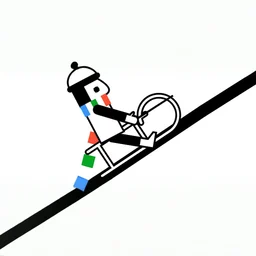
 Line Rider
Line Rider
You might also like
 Car Drawing Game 3DDraw a car with one line and race it against real players online.
 Single Line: Drawing PuzzleRedraw each shape in one unbroken stroke to solve every puzzle.
 Draw LineDraw a line your stickman hero walks on, dodge obstacles and reach the castle flag.
 Single Stroke Line DrawTrace each shape in one continuous stroke without lifting or crossing your path.
 Bouncy Buddies: Physics PuzzleDrag blocks to bounce a hero through 120+ physics levels and rescue Bouncy Jr.
Line Rider has one of the simplest premises in gaming: draw a line, and ride on it. You sketch a track with your mouse, then set a little sledder loose to slide down whatever you have drawn, carried entirely by gravity and momentum. There is no score and no finish line, just you, a blank canvas, and the physics that bring your track to life.
It is an all-time favorite that began life as a flash game and now runs in HTML5, so you can play it free in your browser on desktop or mobile. The appeal is creative rather than competitive: the better and smoother your track, the more satisfying the ride, and there is no limit to what you can build.
Line Rider quick facts
| Detail | Value |
|---|---|
| Genre | Simulation |
| Platform | Web browser (desktop & mobile) |
| Price | Free to play |
| Rating | 4.5/5 from 1,136 votes |
What is Line Rider?
Line Rider is a physics-based drawing sandbox. Instead of completing levels, you create them, drawing the hills, slopes and ramps that a sledder will then travel across. Once you press play, the rider follows your lines exactly as real momentum would dictate, speeding up on the way down and slowing as it climbs. That makes it part toy, part creative tool: you experiment, watch the run, tweak the track, and try again. It has been a relaxing, open-ended favorite for years precisely because there is no pressure, only the fun of designing a ride that flows.
How to play Line Rider
Getting started could not be easier. You use the left mouse button to draw lines on the canvas, building up a track piece by piece. When you are happy with it, you start the run and the sledder rides along the lines you have laid down. Because everything obeys physics, the shape of your track is what decides the ride, so the real game is in the drawing rather than any twitch reactions. It plays the same in your browser on a computer, phone or tablet.
| Action | Control |
|---|---|
| Draw a line | Left mouse button |
| Build a track | Keep drawing connected lines |
| Watch the ride | Start the run |
Building a track that flows
The fun of Line Rider is learning how your lines shape the ride. A long downhill slope lets the sledder build and keep speed, while a gentle curve smooths out the run so it does not jolt to a stop. Steep drops add speed quickly, and a gap at the end of a ramp turns into a jump. Rough, jagged lines tend to throw the rider off, so most good tracks are about drawing clean, connected curves that let momentum carry through.
| Line shape | Effect on the ride |
|---|---|
| Long downhill slope | Builds and keeps speed |
| Gentle curve | Smooths the ride |
| Steep drop | Adds speed fast |
| Gap after a ramp | Launches a jump |
The history of Line Rider
Line Rider was originally created in 2006 by Bostjan Cadez, a developer from Slovenia. It started as a flash project and quickly became hugely popular, spreading through video sites where people shared elaborate hand-drawn tracks, some of them synced to music. That community creativity is a big part of why the game has lasted: the simple draw-and-ride idea turned out to have almost endless depth. Today it lives on in an HTML5 version you can play in any modern browser, with mobile apps available too.
Is Line Rider free and unblocked?
Yes. Line Rider runs entirely in your browser, free to play with no download or account required. Because it loads as a web page it works unblocked at school or work wherever browser games are allowed. It plays on desktop with the mouse and also works on phones, tablets and Chromebooks straight from the browser, and there are Android and iOS apps if you prefer it installed, though you can keep drawing tracks right here.
Get Line Rider on your phone
Line Rider also has a mobile app. Keep playing here, or get it from Google Play and the App Store.